Nintendo Switch App
Nintendo Co., Ltd.Entertainment
3.911.05K Reviews
- Version
- 3.6.0
- Installs
- 10.00M
- Age Rating
- Everyone
Screenshots
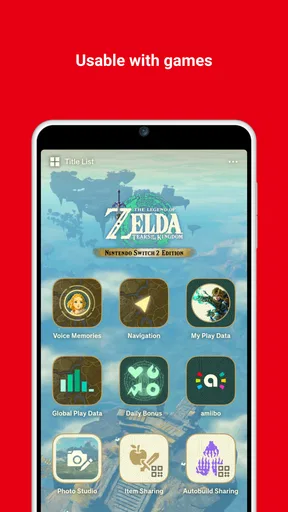
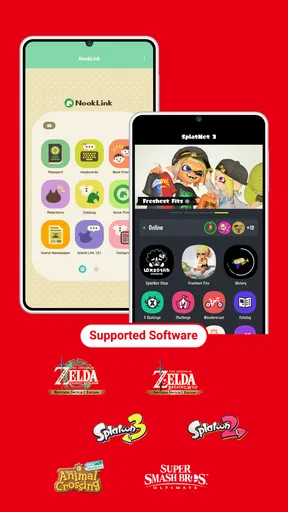
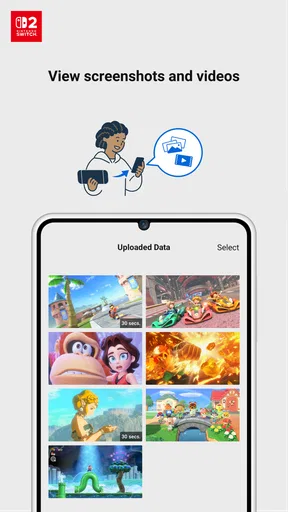
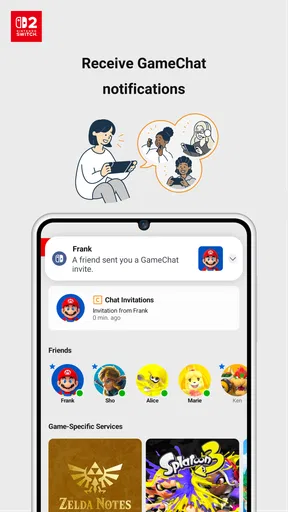
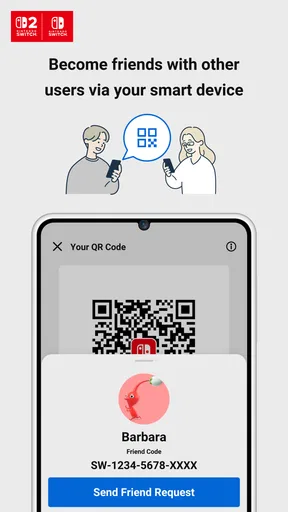
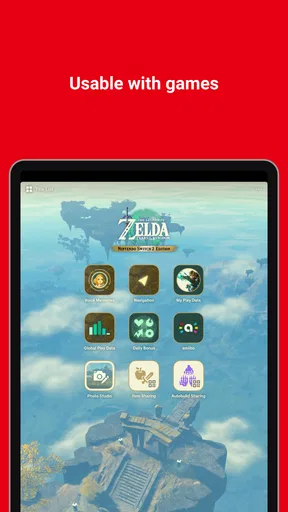
Our Review of Nintendo Switch App
 Analysis by Appyee
Playing on Nintendo Switch is usually a shared experience: the console is in front of you, friends are nearby or online, and your phone is often sitting within reach. Nintendo Switch App is designed to connect those two screens. Developed by Nintendo Co., Ltd., this free entertainment app works as a companion for people who want to extend their console experience without treating the phone as a replacement for the Switch itself.
I found its value depends heavily on how you play. If you regularly use Nintendo’s online features, communicate with other players, or want companion functions around supported games, it can make the console feel more connected. If you mainly play offline or expect a complete social platform with every feature in one place, the experience is more limited. My overall impression is that it is useful in the right Nintendo-centered routine, but it is not an essential download for every Switch owner.
What the app feels like in everyday use
The first thing to understand is the app’s role. It is not a mobile version of your Switch library, and it is not meant to replace the console’s menus. Instead, it acts as a bridge between your Nintendo account, your phone, and selected parts of the gaming experience. That distinction matters because it prevents a common disappointment: installing it will not turn an ordinary phone into a portable Switch.
In my experience, the most sensible way to use it is alongside the console. I might have the Switch docked in the living room while the phone handles companion tasks. That division feels natural when I am already playing and need a second screen for communication or related information. It feels less useful when I open the app without a specific reason, because its usefulness is tied to what I am doing on Nintendo’s platform at that moment.
The app belongs in the entertainment category, but that label does not fully describe its character. It is closer to a console companion than a conventional streaming, video, or social app. The store describes it as a Nintendo Switch app, and that narrow focus is both its main strength and its main limitation. You are getting a focused tool for Nintendo users rather than a broad gaming community that works independently of the hardware.
For a realistic example, imagine finishing work and joining friends for an online session. I would keep the console focused on the game and use the phone for the supporting part of the session. That can reduce the need to jump repeatedly through console screens. The benefit is not dramatic every second, but during a longer evening it makes the surrounding routine feel less fragmented.
Who gets the most from it
I would recommend it first to active Switch players who use online functions and want Nintendo’s own companion experience rather than a collection of unrelated third-party tools. It is also a reasonable choice for families or groups that share a console and want a phone-based way to stay connected to the Nintendo side of their gaming habits.
It is less compelling for someone who bought a Switch mainly for solo adventures, local play, or occasional short sessions. In that situation, the phone may not add enough to justify another app. The same applies to players who already organize every conversation through a separate service and do not want to maintain a second communication layer.
The age rating is Everyone, which makes the app approachable for a broad audience. That does not automatically mean every feature will be equally important to every age group. A younger player may simply need a parent or account holder to manage the wider Nintendo setup, while an experienced player may care more about reducing friction during online sessions. The rating tells me the app is broadly accessible, not that it offers the same value to everyone.
How the current version fits into the experience
The current version is 3.4.1, and that detail is useful because companion apps can change gradually rather than through one obvious redesign. I see this release as part of an ongoing effort to keep the phone-side experience aligned with Nintendo’s console ecosystem. It is better to judge it as a maintained companion than as a one-time utility that has been left untouched after installation.
That evolution is important for existing users. A person who installed the app earlier may notice that its usefulness depends on keeping the app current and allowing it to remain part of the regular Nintendo routine. Updates in this kind of product are not only about visual changes; they can also affect compatibility and how smoothly the phone and console cooperate. I would therefore avoid judging the app solely by an old first impression.
At the same time, a newer version does not change the basic identity of the product. It remains centered on Nintendo Switch rather than becoming a general-purpose gaming hub. That is a healthy expectation to set before downloading it. Version progress can improve the companion experience, but it does not erase the boundaries created by the app’s narrow purpose.
Small workflow choices that make a difference
One useful habit is to decide before opening the app what job you want it to perform. I get more from it when I treat it as part of a specific session: checking the companion side of a game, handling communication, or staying connected to Nintendo-related activity. Opening it casually and hoping it will reveal a large catalogue of independent entertainment is a poor fit for what it is built to do.
A second practical tip is to think of the phone as a support screen, not the main screen. When I keep the console responsible for gameplay and the phone responsible for its companion role, the arrangement feels cleaner. Trying to make the phone carry the entire experience creates unnecessary switching between devices and makes the app seem weaker than it is.
A third insight is that its usefulness increases with repetition. A player who joins online sessions every week can develop a simple routine around it, while someone who plays online once every few months may forget why it is installed. That means the decision is not really about whether the app has any value; it is about whether your playing habits create enough opportunities for that value to appear.
There is also a trade-off between integration and flexibility. Nintendo’s own app is appealing because it belongs to the same ecosystem as the console. However, that focus means it cannot be expected to replace every function offered by broader messaging or gaming-community apps. I would choose it for Nintendo-specific convenience, not for maximum cross-platform freedom.
What existing users should expect from the product’s evolution
The app has been available since Jul 18, 2017, so it is not a new experiment. That history helps explain why it feels like a companion layer built around the Switch era rather than a modern all-in-one social network. Existing users who have kept it installed are likely to value continuity: the app remains recognizable as part of Nintendo’s approach to connected play.
For new users, the long availability also suggests that the app is intended to have a continuing place beside the console. Still, I would separate that observation from any promise about future additions. A current version can show that Nintendo continues to maintain the app, but it cannot guarantee which functions will arrive later or how the experience will change.
The app’s reach is substantial, with over ten million installs, and it has an average rating of 3.8 from around seventy-seven thousand ratings. I read those figures as evidence of broad interest combined with mixed experiences, rather than as a simple verdict. A companion app can be genuinely useful to one type of player and unnecessary to another, so the rating needs to be interpreted alongside your habits.
There are also around eleven thousand written reviews, which makes it clear that many users have had enough interaction with the app to form a detailed opinion. I would not treat the volume of feedback as proof that all players use it in the same way. Instead, it reinforces my view that expectations matter: people looking for console-linked convenience may be satisfied, while people expecting a complete mobile gaming destination may be disappointed.
Where the experience still has gaps
The biggest gap is the distance between the app’s name and what some users may imagine it can do. “Nintendo Switch App” sounds broad, but the actual value comes from companion functions around the console. If you want to play Nintendo games directly on your phone, this is not the right download. If you want one universal place for every gaming conversation, it is also unlikely to meet that goal.
Another limitation is dependence on context. The app does not have the same appeal when the Switch is turned off or when you are away from the Nintendo ecosystem. Many entertainment apps work perfectly well as standalone products; this one makes more sense when the console is part of your day. That can feel restrictive, especially for users who prefer apps that provide independent value during travel or spare moments.
Communication can create another point of friction. A dedicated Nintendo companion may be convenient for Nintendo-focused sessions, but friends may already use another service. Asking everyone to adjust to an additional app is not always practical. In a group that has already settled on a different platform, the Nintendo app may be best used for its console-related role rather than as the only place to coordinate.
I also would not install it simply because it is free. Free removes the purchase risk, but it does not remove the cost of attention. Every extra app needs space on the phone, occasional updates, and a place in your routine. If you rarely use the connected features of your Switch, leaving it uninstalled may be the more sensible choice.
That said, the limitations are not signs that the app fails at its intended job. They are boundaries. I prefer it when Nintendo keeps the product focused instead of filling it with unrelated features that would make the experience harder to understand. The question is whether that focused design matches your own use case.
How it compares with usual alternatives
Compared with a general messaging app, Nintendo Switch App offers a more direct relationship with the Nintendo ecosystem but less variety outside it. A general service is usually better for mixed groups, multiple platforms, and conversations that continue whether or not anyone is playing. Nintendo’s companion is better when the conversation is specifically connected to Switch activity.
Compared with using only the console, the app can provide a more convenient second-screen workflow. The advantage is not that it makes every task faster; it is that it moves some supporting activity away from the game display. If you dislike handling console menus while playing, that separation can be worthwhile. If you prefer keeping everything on one screen, the extra device may feel unnecessary.
Compared with a standalone entertainment app, it offers a much narrower kind of entertainment value. You do not install it for endless independent content. You install it because you already participate in Nintendo’s world and want a companion for that experience. For me, that makes it a specialist tool, not a replacement for the broader apps already on my phone.
The free price is an advantage when you are curious, since trying it does not require a purchase. I would still recommend testing it during an actual online or companion-focused session rather than judging it from the first launch. Its usefulness appears during play, not necessarily during a quick look at the opening screens.
Questions I would answer before downloading
If you are wondering whether a Switch console is required, my practical answer is yes: the app’s purpose is tied to the Nintendo Switch experience. Without regular access to the console and its related activities, there is little reason to expect the app to become a satisfying standalone entertainment product.
If you are asking whether it replaces the games themselves, it does not. I would think of it as an accessory in software form. The console remains where the main gaming experience happens, while the phone can handle selected supporting tasks.
If you are concerned about cost, the app is free. That makes it easy to try, but I would still judge it by how often you use its companion functions. A free app that sits unused is not more useful than a paid app you never open.
If you want to know whether it is suitable for a child, the Everyone rating makes it broadly accessible, but the wider Nintendo account and online-play context still deserve normal family supervision. The rating is reassuring for general access, while the actual setup should match the player’s age and the household’s rules.
Finally, if you already use another communication platform, you do not necessarily need to abandon it. In my view, the best approach is to keep the service your group already understands and use Nintendo’s app where its Switch connection adds something specific. That avoids turning a companion tool into a forced replacement for every other app.
My recommendation after using it
The strongest reason to install Nintendo Switch App is not the promise of more entertainment; it is the convenience of keeping Nintendo-related support close to the console. That makes it a good match for regular online players, Nintendo-focused households, and anyone who appreciates a second-screen companion during play.
I would skip it if you mainly play offline, rarely use connected features, or want a broad mobile gaming community that works independently from Nintendo hardware. In those cases, a general communication app or no companion app at all may be the better choice.
For me, the app succeeds when I use it deliberately and accept its narrow role. It is free, rated Everyone, and maintained by Nintendo Co., Ltd., with a current version of 3.4.1. Those details make it an easy experiment for Switch owners, but they do not turn it into a must-have for everyone.
My final recommendation is therefore conditional but positive: install it if your normal Nintendo routine includes online play or companion functions, then judge it during a real session rather than from the store summary. It works best as a quiet extension of the console, not as a separate destination competing with your usual entertainment apps.
Privacy and Permissions
See what permissions an app requests and how it handles your data.
- Photos/Media/Files
- read the contents of your USB storage, modify or delete the contents of your USB storage
- Storage
- read the contents of your USB storage, modify or delete the contents of your USB storage
- Camera
- take pictures and videos
- Microphone
- record audio
- Other
- view network connections, pair with Bluetooth devices, full network access, change your audio settings, run at startup, control vibration, prevent device from sleeping
Verdict
Strengths of Nintendo Switch App
- Official Nintendo companion app with reliable account integration
- Useful access to game news, announcements, and Nintendo updates
- Lets users view selected game-related activity from their phone
- Simple interface that is easy for casual Nintendo users to navigate
- Available on both Android and iOS devices
Limitations of Nintendo Switch App
- Many features require a Nintendo Account login
- Functionality differs depending on region and supported Nintendo services
- Some features are limited to compatible Nintendo games or consoles
- Notifications may become excessive if several updates are enabled
- It does not replace the full Nintendo Switch console experience
Other Releases by Nintendo Co., Ltd.
View All
Super Mario Run
Action3.9

Mario Kart Tour
Action4.3

Nintendo Switch Parental Cont…
Lifestyle4.7

Fire Emblem Heroes
Simulation4.5
Similar Picks in This Category
View All
Google Play Games
Google LLC3.9

Netflix
Netflix, Inc.4.8

YouTube Kids
Google LLC4.2

Disney+
Disney4.4

Prime Video
Amazon Mobile LLC4.7

Steam
Valve Corporation3.2
Frequently Asked Questions
What is the Nintendo Switch App and what can I use it for?
The Nintendo Switch App is Nintendo’s official mobile companion for compatible Nintendo Switch features and services. Depending on your account, region, and the game you are playing, it can provide voice chat, game-specific services, online activity information, and access to selected Nintendo content. It is not a complete replacement for the Nintendo Switch console, and its available functions may differ between games and countries.
Do I need a Nintendo Switch Online membership to use the Nintendo Switch App?
Many of the app’s main features are connected to Nintendo Switch Online services, so an active Nintendo Switch Online membership may be required. The exact requirements depend on the feature and supported game. You also need a Nintendo Account, a compatible smartphone, and an internet connection. Families should check which account is signed in, because access and game-related information may vary by user.
Which games and features are supported by the Nintendo Switch App?
Support is not identical across every Nintendo Switch title. Some games offer special mobile services, statistics, item management, voice chat, or other companion features, while others may not connect to the app at all. Nintendo can also change or discontinue individual services. Before downloading, check the app’s current store description and the official Nintendo support page for your region.
Can I use the Nintendo Switch App for voice chat while playing?
For compatible games, the Nintendo Switch App can be used as part of Nintendo’s voice-chat system, but it requires the appropriate Nintendo Switch Online service and a reliable internet connection. You generally need to keep the phone available while playing, and a headset can improve sound quality. Voice-chat availability, age restrictions, parental controls, and supported games may vary by region.
Is the Nintendo Switch App free, and what devices are compatible with it?
The Nintendo Switch App can generally be downloaded at no additional charge from the official Android or iOS store, although some connected features require a paid Nintendo Switch Online membership. Compatibility depends on your phone’s operating system, available storage, Nintendo Account, and internet access. Keep the app updated, and download it only from an official store to avoid unofficial or unsafe versions.
